 omergulcicek
What Is UI SDK? Behaviors, Not Components, for Agents
· 6 min read · AI, Accessibility
On November 12, 2026, shadcn announced UI SDK, built at Vercel.1 In its own words, UI SDK is "a library of behaviors for agents to build the next generation of user interfaces."2 Here's how I'd put it: Bootstrap gave developers a shared visual language. UI SDK gives agents a shared behavioral language, to both build interfaces and use them.
In this post I explain what UI SDK is and how it works, with a few examples.
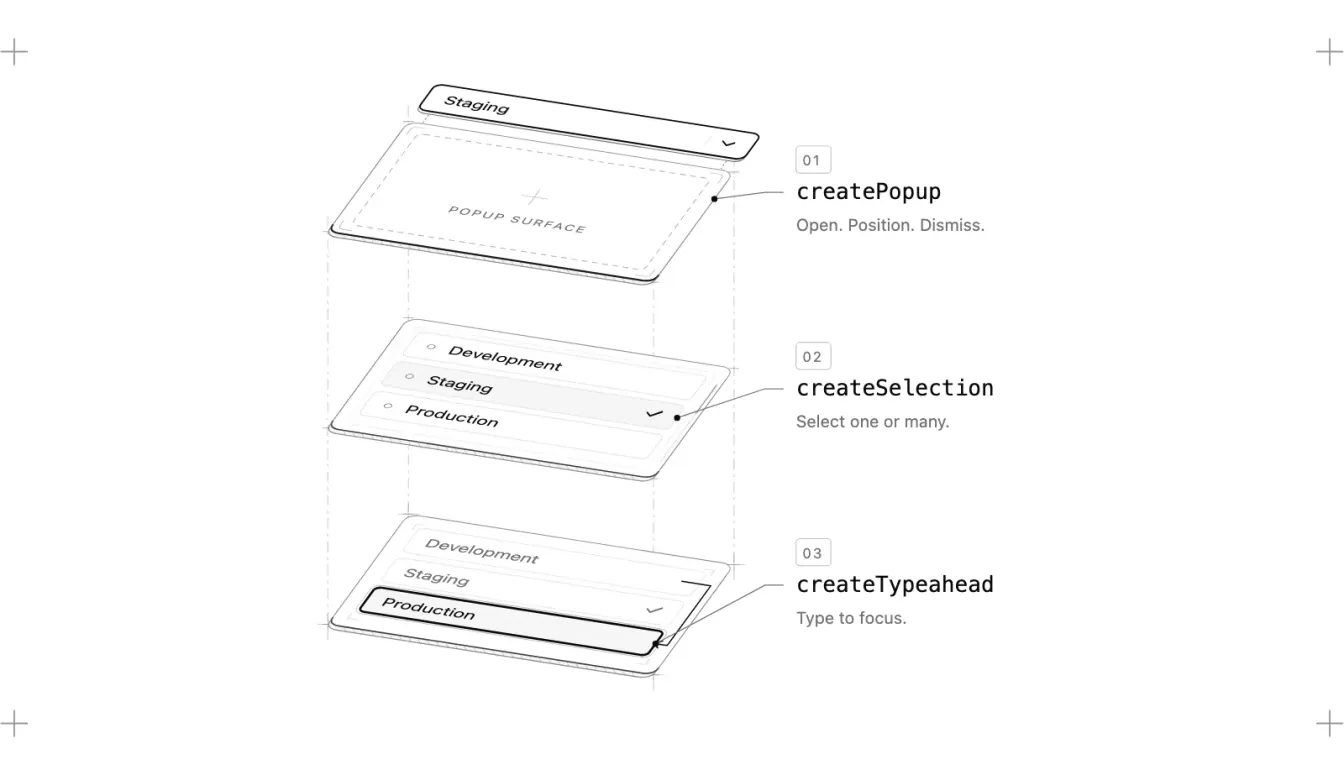
Behaviors, not components
In the announcement, shadcn asks a question: if agents are becoming both the builders and the users of interfaces, where should the abstraction live? The answer is to take a component like a Select, pull apart its popup, selection logic, keyboard navigation and focus management, and turn them into tested, reusable pieces.1
The image above shows the idea. A Select is really three behaviors:3
createPopup: Open, position, dismiss.createSelection: Select one or many.createTypeahead: Type a few letters to jump to an option.
Give an agent these pieces instead of a Select, and it can build not just a Select but an autocomplete, a combobox, or a component nobody has thought of yet.3 The home page says there are more than 50 behaviors, covering focus, selection, drag and drop, resizing, virtualized lists and screen reader support.3
shadcn sums up the idea in a second post: "You and I don't need the same interfaces. We need the same interface behaviors." Your agent might generate a calendar to pick a date; mine might generate a simple input. The interfaces can differ, but the underlying guarantees should stay the same.4
Primitives: putting behaviors together
The structure that brings behaviors together into a component is called a primitive. A primitive describes a component's state, the functions that change it and the parts that use it; it doesn't render anything on its own.5 The smallest example in the docs is a mute button:
import { definePrimitive } from "@ui-sdk/core"

const muteButton = definePrimitive({
  name: "mute-button",
  state: () => ({ muted: false }),
  api: (context) => ({
    toggle: () => context.store.set({ muted: !context.store.get().muted }),
  }),
  slots: (slot) => ({
    root: slot({
      attrs: (state) => ({
        type: "button",
        "aria-pressed": String(state.muted),
      }),
      press: ({ api }) => api.toggle(),
    }),
  }),
})
attrs turns state into HTML attributes: when muted is true, the button gets aria-pressed="true". press calls toggle when the button is clicked or activated from the keyboard.5 Rendering it in React looks like this:
import { createParts } from "@ui-sdk/react/primitive"

const { Root: MuteButton } = createParts(muteButton, { root: "button" })

function Example() {
  return <MuteButton>Mute</MuteButton>
}
The behavior stays in the primitive, and the same primitive works in React, Vue, Svelte, Solid and Web Components. Parts come unstyled; you write CSS against data-slot and the state attributes.5
How to use it
UI SDK is in beta. You install the core package with your framework's adapter, then give your agent the skill:2
npm install @ui-sdk/react @ui-sdk/core
npx skills add vercel-labs/ui --skill ui-sdk
The real point is that you don't write the primitive yourself. The README says it plainly: "you don't need to learn how to write this. Your agents will."2 You describe the interaction to the agent in concrete terms. The example in the docs is an emoji picker: pressing Down from the search input moves focus to the first result, arrow keys move through the grid, Enter selects, and the selection is announced to screen readers.6 Each package ships Markdown docs that match the installed version, so the agent reads the docs for the version you actually have.6
Agents can use the interface too
To me, the second half of UI SDK is at least as interesting as the first: the agent doesn't just build the interface, it can use it. According to the home page, agents read the page and work the controls directly, without screenshots.3
You add a bridge to your app. snapshot() lists the components on the page, their state and their actions, and the agent changes a value by calling the component's API instead of clicking and typing:7
import { createAgent } from "@ui-sdk/react/agent"

const agent = createAgent()

agent.snapshot()
// [{ ref: "c1", component: "input", label: "Project name", value: "Apollo", actions: ["setValue", "clear"] }]

await agent.act({
  steps: [{ ref: "Project name", action: "setValue", args: ["Atlas"] }],
})
This is where accessibility and agent support meet: the input's accessible name helps both people using a screen reader and agents identify it.7
You also decide what the agent can touch. An allow callback chooses which actions can run, data-agent-confirm makes a button always wait for the person, and data-agent-hidden keeps a section out of the agent's view entirely.8 The experimental createHistory can undo only the agent's changes.9
In the team's benchmark, an agent filled in the same settings screen in React, built with Base UI and Ark UI using browser tools, and with UI SDK using the bridge:10
| Base UI | Ark UI | UI SDK + bridge | |
|---|---|---|---|
| Tool calls | 17 | 19 | 7 |
| Tokens | 291.7k | 330.9k | 69.5k |
| Time | 53 s | 65 s | 31 s |
| Cost | $0.139 | $0.144 | $0.044 |
The note under the table is the most important part to me: running the UI SDK screen with browser tools took about as much as the other libraries. In other words, the difference comes from the bridge, not the library.10
A new door?
The first question that comes to mind: isn't this the promise of every headless library? I agree that separating behavior from styling isn't a new idea, and UI SDK calls its components headless too.11 What's new is two things: the abstraction moves one level below the component, down to behavior, and it assumes the one writing the code and the one using the interface can both be agents.
That's where the Bootstrap comparison comes from. With Bootstrap, everyone used the same button, modal and grid classes; what they shared was the look. With UI SDK, what's shared isn't the look but the behavior: every agent can generate a different interface, yet Escape still closes the popup and focus isn't lost when the focused item disappears. As shadcn puts it, the interfaces can be different; the guarantees stay the same.4
There are open questions too. UI SDK is in beta, and its APIs and behavior may change before general availability.2 Even if an agent writes the primitive, we're still the ones reading it when something breaks; I think it's worth building one definePrimitive by hand at least once. And without an allow callback, the bridge accepts every supported action;8 what an agent is allowed to press isn't a decision to leave to the defaults.